
Guides & Comparisons
Location Data Privacy: What Device Tracker Plus Does With Your Data
The DTP Team · 7 Sept 2026 · 6 min read
Guides & Comparisons
 The DTP Team · 2 October 2026 · 8 min read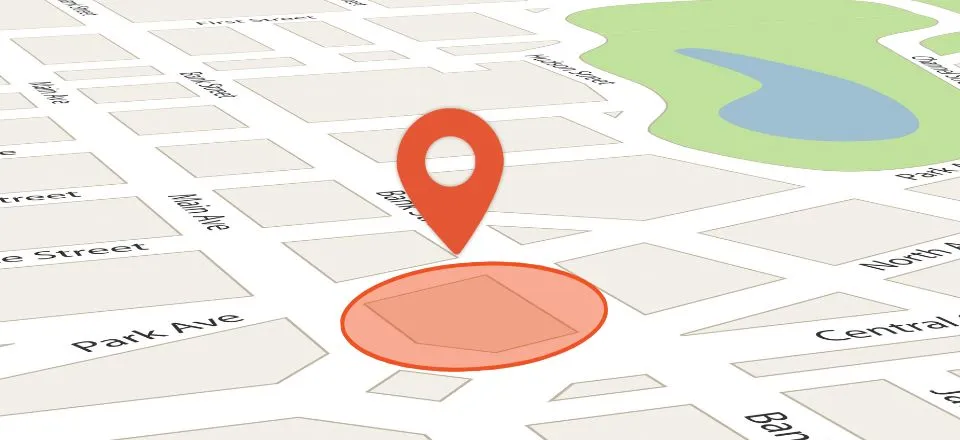
Every parent knows the quiet tension that accompanies the morning routine. You pack school lunches, hand over bus passes, and remind everyone to look both ways before crossing the road. Once the front door closes, an instinctive countdown begins in your head. You find yourself checking your watch at ten to nine, waiting for a quick text to say they arrived safely, or wondering if heavy morning traffic delayed their bus.
For years, the technological answer to this daily worry was continuous map-watching. Parents were expected to open an app, wait for a satellite connection, and watch a digital pin inch along a map. But staring at a screen while trying to start your own working day is stressful, and it makes children feel micro-managed.
Understanding how geofencing works for family safety reveals a much calmer, smarter way to stay connected. By setting up virtual safe zones around everyday destinations, technology handles reassurance quietly in the background, giving you instant arrival confirmations without turning your household routine into a security operation.
At its core, a geofence is simply an invisible, virtual perimeter drawn around a specific physical location on a map. Think of it like drawing a neat circle around your home, your child’s secondary school, or your partner’s workplace.
Inside modern safety software, these virtual perimeters are paired with automated triggers. Whenever a connected smartphone crosses into or out of that circle, the system registers the event and sends an instant place notification to the family group.
Instead of requiring someone to pull out their phone, unlock the screen, and type “I’m here,” the software detects the arrival automatically. It turns a manual chore into a passive safety net that operates seamlessly in the background of daily life.
This capability is built on two simple trigger states:
One of the most persistent concerns parents raise about location sharing is battery life. We have all used turn-by-turn driving navigation in a car and watched our phone battery plummet while the device becomes hot to the touch. It is natural to assume that setting up safe zones around multiple locations would cause similar battery drain.
In reality, passive geofencing works very differently from active road navigation. When an app provides live driving directions, the phone’s screen stays lit, complex maps render continuously, and the GPS hardware polls satellites at maximum frequency every few seconds. This continuous hardware usage is what empties a battery.
Background geofencing, by contrast, relies on intelligent hybrid positioning managed directly by the mobile device’s operating system. Both Apple iOS and Android handsets feature dedicated, low-power region monitoring frameworks designed to protect battery life.
Instead of keeping power-hungry GPS chips awake all day, the system sleeps until a major location shift occurs. The phone monitors low-energy signals—such as shifts between regional cellular towers and nearby Wi-Fi network IDs—to detect general movement.
Only when the handset gets close to a designated virtual boundary does the operating system briefly wake up high-precision location hardware to check if the line has been crossed. Once the boundary event is logged, the hardware returns to its low-power sleep state.
This smart engineering means you can configure multiple safe zones across your city without worrying about your child’s or partner’s phone running out of power before the day is over.
There is a profound psychological difference between receiving a gentle arrival notification and actively watching a moving pin on a live map. Continuous map-watching often manufactures unnecessary anxiety out of ordinary daily occurrences.
If you are staring at a screen and notice a pin pause for two minutes on a side street, your imagination can easily run wild. In reality, your child probably stopped to tie their shoelace, chat with a friend, or browse a shop window. Watching every footstep creates artificial urgency and can tempt parents to make distracting phone calls right when a child needs to focus on crossing a street.
Furthermore, being constantly watched erodes trust. Teenagers, in particular, need the psychological space to develop independence and self-reliance. When they know an adult is scrutinising their exact route step-by-step, it feels like an invasive lack of confidence in their abilities.
At Device Tracker Plus, our core values are built on Safety Without Surveillance and Connection, Not Control. We believe location sharing should operate like an umbrella: ready to provide protection when needed, but carried quietly without making a fuss. Automated safe zones provide the perfect compromise, delivering essential arrival confirmations while giving family members complete freedom to navigate their day.
When incorporated naturally into your household routine, automated place alerts remove dozens of minor daily logistical headaches. Families use safe zones across a wide range of everyday scenarios:
Configuring a safe zone is straightforward, but taking a few minutes to optimise your settings ensures you receive accurate alerts without annoying false alarms.
The most critical setting is the boundary radius. While it might be tempting to draw a tight circle directly around your front door, mobile GPS naturally experiences minor signal variations, especially when a phone is indoors or surrounded by tall buildings.
If a safe zone radius is set too small—such as 20 or 30 metres—natural indoor signal drift can cause the phone to momentarily appear outside the circle, triggering a false departure alert while your child is sitting on the sofa.
Setting a radius between 100 and 250 metres is the sweet spot for most residential homes, schools, and workplaces. This size provides a comfortable buffer that absorbs natural GPS drift while ensuring that genuine departures and arrivals register the moment someone approaches the street entrance.
Naming your safe zones clearly also helps keep household communication simple. Labels like “High School”, “Grandma’s House”, or “Sports Ground” make incoming notifications instantly recognisable on your lock screen, allowing you to absorb the update at a glance and carry on with your day.
For location sharing to remain a positive force in family life, it must be introduced with complete transparency and mutual agreement. Technology should never be used to secretly monitor family members or enforce rigid control.
Before setting up safe zones, sit down with your household and talk through how the system works. Explain that automated alerts are designed to replace annoying “Where are you?” texts, giving everyone more freedom rather than less.
Make location sharing a shared family utility. When parents share their locations alongside their children, it establishes a healthy dynamic of mutual care. Teenagers appreciate knowing when a parent is heading home from work just as much as parents appreciate knowing their kids made it safely to a friend’s house.
Building open communication around digital boundaries ensures that safe zones feel like a supportive safety net that everyone benefits from equally.
Choosing software to handle your family’s daily safety requires a platform built on mature engineering and transparent principles. You need to know that your arrival alerts will trigger reliably, regardless of which phone brands your household prefers.
Device Tracker Plus was founded in 2016, giving our platform a solid decade of engineering experience in location sync and mobile security. Our Mobile Safety Suite companion app links up to 5 family devices under a single plan across both iOS and Android platforms, allowing mixed-device households to coordinate without technical friction.
Alongside automated safe zones, the platform provides continuous live location sync, 30-day journey timelines to review recent routes, and a one-tap emergency SOS broadcast button for urgent situations. If a phone is ever mislaid, our browser-based Quick Web Search tool allows you to locate a handset via SMS consent, even including a backup contact number so a helpful finder can call you directly.
Most importantly, we believe that looking after your family should never compromise your digital privacy. We will never sell your data. Your private movement histories, safe zone logs, and account details remain encrypted and strictly protected within your approved family circle.
Family life moves fast, and staying connected with the people who matter shouldn’t require constant stress, frantic text messages, or invasive oversight.
Geofencing transforms modern family safety by turning routine check-ins into an automated, quiet background service. It gives children the space to build confidence and independence, gives partners a frictionless way to coordinate busy days, and gives parents the reassurance they need to relax.
By setting up thoughtful safe zones and leaning on technology that respects your privacy, you can take the anxiety out of the daily routine and enjoy genuine peace of mind every single day.
Geofencing creates a virtual boundary around a real-world location, such as a school, home, or workplace. When a family member's phone crosses that boundary, the safety suite automatically sends an arrival or departure notification to connected family members.
A radius between 100 and 250 metres works best for most homes, schools, and workplaces. This size provides reliable trigger accuracy while preventing false alarms.

Device Tracker Plus
We build Device Tracker Plus, a location-sharing app for families, couples and carers who want to stay connected without compromising on privacy. This blog is written by the same team that builds and supports the app.
The DTP Team · 7 Sept 2026 · 6 min read

The DTP Team · 2 Sept 2026 · 9 min read
The DTP Team · 27 Aug 2026 · 7 min read
Connection, not surveillance. Share your location with the people who matter — never with anyone else.
We never sell your personal data.